Friday, 24 May 2013

Next-generation Kinect for Windows won't be for the average user


Microsoft has made it official: The new-and-improved Kinect that will ship with the Xbox One later this year will also come to Windows in 2014.
The Windows version will offer the same improvements found in the Xbox One’s Kinect. The device has a wider field of view, better depth detection, an improved noise-canceling microphone, more precise skeletal tracking, and ambient light detection.
But don’t expect Kinect to replace your PC’s mouse and webcam anytime soon. Microsoft still envisions Kinect primarily as a product for businesses and organizations, though the company expects consumers to interact with the motion controller in public places.
MICROSOFT
The new Kinect sensor in action
“It’s going to be the spaces that are stand-up play spaces similar to the living room experiences,” Bob Heddle, Microsoft’s director of Kinect for Windows, said in an interview. “I would imagine that most consumers will see this in interactive retail screens, for example … virtual product trial is very interesting, things like magic mirrors to try on virtual clothing.”
So far, Microsoft has not marketed Kinect for Windows as a consumer product. At $250, the device is $150 more expensive than its Xbox 360 counterpart, and Microsoft offers no central location where users can download Kinect apps. It’s unclear whether the Windows Store will support apps for the next version of Kinect—Microsoft is promising more developer details at its Build conference next month—but it’s safe to assume that consumer applications won’t be a focus either way.
Meanwhile, other companies are bringing motion controls to the consumer market. Leap Motion, for example, will ship its 3D motion controller in July for $80, and Thalmic Labs’ MYO will launch next year for $150.
Microsoft sees Kinect as a more complete solution than those products. Heddle lamented how people perceive Kinect as just a depth sensor when it can also detect color, audio and—in the case of the new Kinect—ambient lighting, and perceive all of those things together. “I think people saw Kinect as a little bit too one-sided,” he said.
Still, those extra capabilities add bulk and cost, which might explain why Microsoft isn’t pitching the Windows version as a consumer device. Microsoft hasn’t revealed a specific price or release date for the next-generation Kinect, but on the Xbox 360, Microsoft subsidizes the cost of Kinect in hopes of making money back on games, Xbox Live subscriptions, and other revenue streams. While Microsoft’s Craig Mundie has said that he could “see a path” toward embedding Kinect technology directly into PCs, Heddle said that was just “speculation.”
Heddle wouldn’t rule out a greater role for Kinect on home PCs, saying that Microsoft has a long-term commitment to touch-free computing and natural user interfaces. But the company sees gestures as one tool among many, rather than a flat-out replacement for the traditional mouse.
“Over time, we really expect that Kinect will turn into the platform that makes computers smarter by knowing what’s going on, and also allowing users to untether from their computers, and stand up, move around in their normal spaces and still be access computing experiences,” Heddle said.
Read More

New HP PCs include 20-inch all-in-one that lies flat for games


HP’s consumer PC sales continue to languish, but the game’s not over yet—certainly not on the company’s new Envy Rove, a 20-inch all-in-one that can lie flat for multiplayer games. The company also announced a raft of other all-in-ones and desktops today.
The Envy Rove all-in-one’s 20-inch LED has a resolution of 1600 by 900 pixels with integrated Intel HD graphics. It’s designed to be portable, with an integrated battery rated to last for up to 3 hours. You’ll likely be tempted to pick it up by its spring-loaded, hinged stand, which is actually designed for users to set the desktop at an angle or to lay it flat on a surface.
HP
The Envy Rove's hinged stand lets the PC sit at an angle or lie completely flat.
The Envy Rove’s ten-point capacitive touchscreen display can function as a gaming table, and it comes preloaded with games including Electronic Arts’ Monopoly, Disney Fairies, and Fingertapps Jigsaw Wars and Musical Instruments. The system will use Intel’s 4th-generation Core CPUs, code-named Haswell. The Envy Rove will be available in July, for a price yet to be announced.
HP
The Pavilion TouchSmart 20 will ship on June 23rd with a starting price of $620.
The other all-in-ones announced today are the 20-inch Pavilion TouchSmart 20 and the 23-inch Pavilion TouchSmart 23. These systems use a less-expensive, five-point optical touchscreen technology and will be offered with a choice of Intel’s fourth-generation Core CPUs and AMD CPUs.
Their easel stands adjust from 10 to 25 degrees. In addition to integrated webcams, the Pavilion TouchSmart all-in-ones will come with 25GB of free Box cloud storage.
HP
The Pavilion TouchSmart 23 will ship on June 23rd with a starting price of $749.
The Pavilion TouchSmart 20 will be available on June 23 for a starting price of $620, and the 23-inch Pavilion TouchSmart 23 will be available on June 5 for a starting price of $749.
HP also announced numerous desktop PCs today. Notable among them are the Phoenix 800 Desktop PC, a gaming system that will use Intel’s fourth-generation Core CPUs, Nvidia discrete graphics, Beats Audio, and optional liquid cooling. It will be available on June 5 for a starting price of $1099.
HP
The Envy Phoenix 800 comes with Beats Audio and optional liquid cooling.
The more serious-minded cousin to the Phoenix 800 is the Envy 700 Desktop PC. Designed for configurability, it has a tool-less side panel and can accommodate up to three hard drives or solid-state drives. Nvidia discrete graphics or AMD graphics are available as options. Offering a choice of Intel’s fourth-generation Core CPUs or AMD CPUs, the Phoenix 800 will go on sale June 5 starting at $599.
HP
The Envy 700 desktop is designed for configurability, with a tool-less side panel and plenty of room for additional components.
With consumer PC sales struggling, HP CEO Meg Whitman admitted today, “we have to take another look at the low end of our product line.” Other than the Envy Rove and maybe the Phoenix 800, nothing in the new line of desktops helps HP stand out—and even the Envy Rove has competition from huge tablet PCs from Lenovo and others. But with new CPUs and a new version of Windows coming soon, HP may at least hope for a rising tide of interest in new PCs.
Read More

Sunday, 19 May 2013

Amazon Coins, 3D Phones, Flying Cars


Read More

Google Glass users say they can be trusted with privacy


Read More

Hands on: New Google Maps make maps interesting again


We may not have a new version of Android to drool over, but at least we've got more feature-filled, better-looking maps. At its Google I/O keynote Wednesday morning, Google announced an enhanced version of its popular Google Maps service. The demos shown on stage drew some applause out of the otherwise listless attendees, and I was itching for the chance to put this improved version of Maps through its paces.
After playing around with Maps and virtually visiting several locales around the world, I'm impressed with how much Google has improved its already great mapping tool—though I think the company might have oversold it a bit on stage.
The new Google Maps
The new desktop Maps version looks fantastic: Google has done away with the navigation bars on the top and left side of the screen, dedicating your entire browser window to your map. For the most part, menus are hidden out of sight, which makes the entire interface feel less cluttered. I know there are people who'll miss all the knobs and sliders of the older version, but if you only really use Google Maps to get around, this new layout will fit your needs perfectly.
Look up an address or city, and you'll immediately fly to that location with an incredibly smooth and fluid animation. Zooming in or panning around the map is much faster than it was previously, and doesn't require you to wait 30 seconds for all the elements of the map to refresh themselves. Switching between the standard and satellite views still isn't as fast as I'd like, but the 3D models that pop up when you zoom in close no longer look like deformed blobs, and you can actually tell buildings apart.

Google Maps, meet Google+

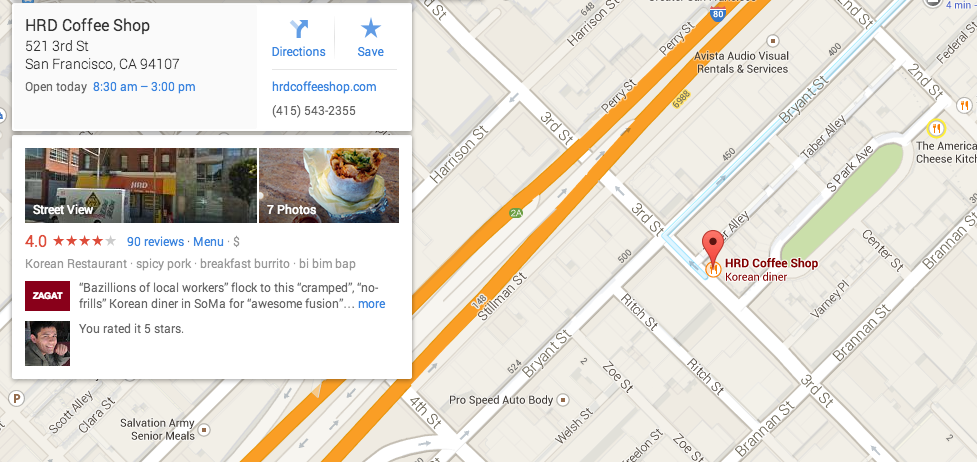
Google, ever trying to find ways to push people into using Google+, has incorporated more social elements into Google Maps. If you search for, say, "Pizza, San Francisco," Google Maps will display pizza restaurants in the area and highlights ones rated highly by Zagat or your friends on Google+.
Searching for a restaurant or venue will return Info Cards like this one.
The new Zagat feature is helpful for finding out basic information like a restaurant's business hours, location, and phone number, and the professionally sourced Zagat reviews are a step up from the reviews you see on Yelp, where people complain about not getting enough napkins. I'd like to tell you how well the Google+ integration worked, but I don't know anyone who actually uses Google+, and even if I did, I would be suspicious of their tastes.

Missing features and delving into the unknown

One feature apparently missing in this latest iteration of Google Maps is the ability to determine a user's general location.
In the current version of Google Maps, the tool uses various data points, such as your IP address and time zone, to more or less pinpoint your location on the map. Typing "My Location" into the search field will drop a marker over where Google Maps thinks you are at that moment. But I tried the same thing in the new Maps preview and was annoyed that Google Maps could no longer figure out where I was. This meant I had to manually type in my starting point whenever I searched for directions—something I may not always know when I'm traveling. Google told me the feature wasn't available in the preview mode that I tried, but that it would include the capability at a later date.
Yeah, yeah, I know I can resort to using my smartphone. But sometimes it's easier to plan things out on a larger screen. Let's hope location awareness rolls out soon.
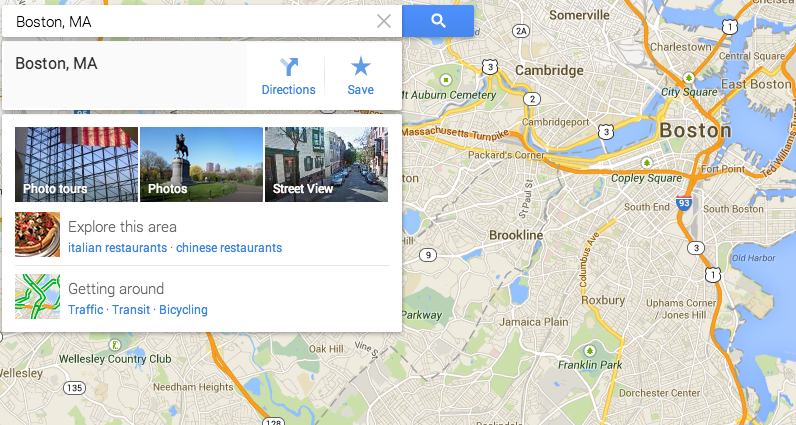
The Explore card shows up when you search for a city or town.
Speaking of going to unknown locations, Google Maps' new Explore functionality helps you find points of interest when visiting unfamiliar cities. When you search for a place by name, an additional card appears listing a small handful of suggestions for places to explore in the area. Search for "Boston" and Google will recommend you check out the city's Italian and Chinese restaurants (somehow I think Boston is famous for a different kind of cuisine than what Google suggests).
The upcoming update to the mobile versions of Google Maps allows you to explore your location based on various categories, but on the desktop you're stuck with the two or three recommendations that Google decides to spit your way.
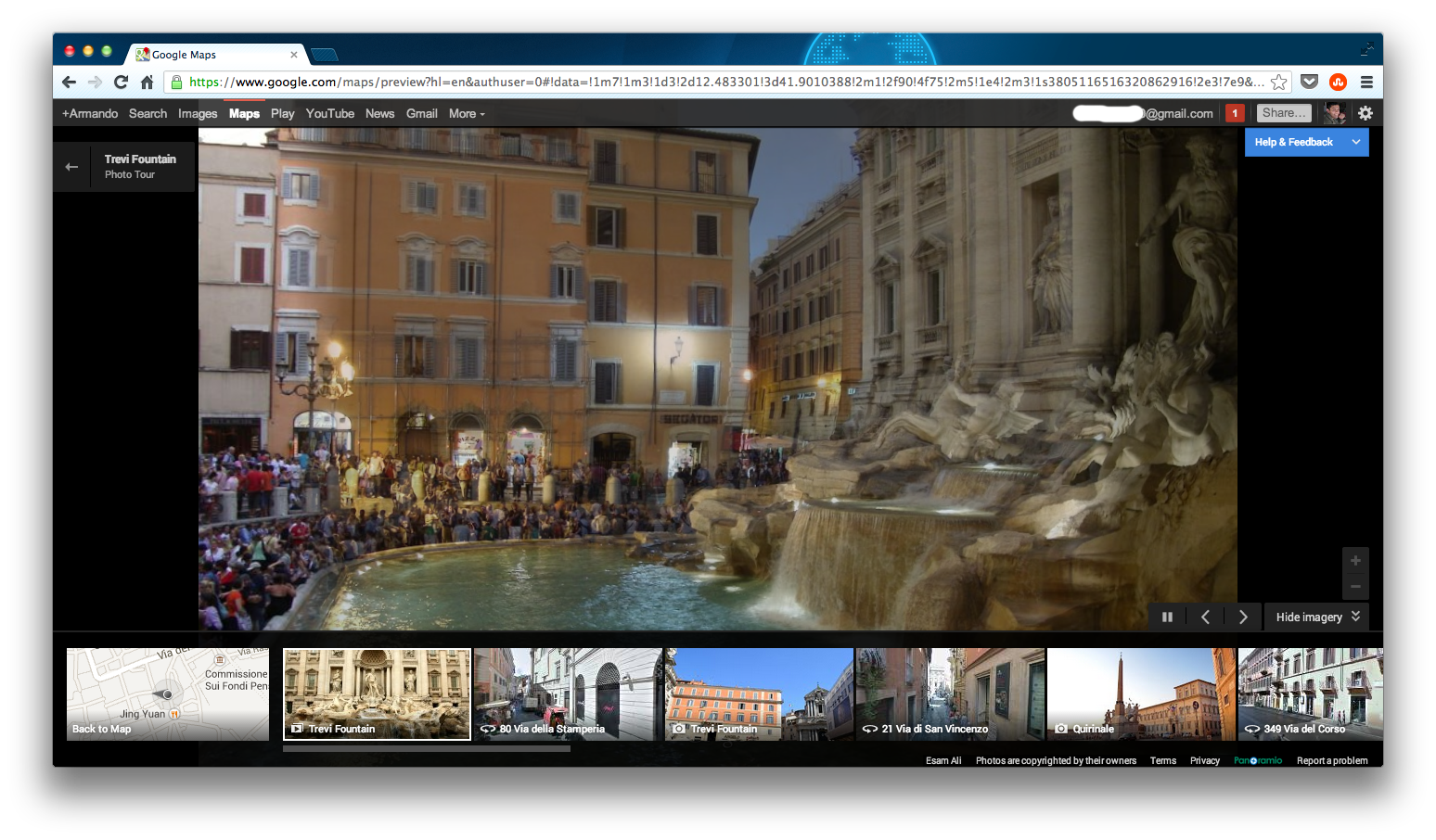
Now you can explore exotic locales from the comfort of your desk.
A more useful way of exploring a location—and one that doesn't involve the lackluster Explore recommendations—is to take a photo tour. After you search for the place you'd like to investigate, click on the tab on the lower right of the screen. Google Maps will present you with photo tours comprised of images taken by other users at the locale. As someone who despises traveling but enjoys taking in new sights, I got a kick out of this feature, as it allowed me to explore places like the Trevi Fountain in Rome without having to deal with the nightmare that is air transport.

Wait to give it a try

The new Google Maps definitely has a lot going for it, though it feels like one of those services that's going to stay in beta for a while. While everything worked and I didn't encounter any real bugs, some elements still need their screws tightened down.
Google will slowly roll out the update in the coming months and most people should have the enhanced version of Google Maps by some time early to mid-June. Hopefully by then, Google will have any kinks worked out, and Google Maps can go back to figuring out where I am without having to type that information in myself.
Read More